Tango Guide Me: Learn Software While You Work

Software is the gateway to almost everything we do at work, and there are seemingly hundreds of processes we need to learn. But even with training and documentation, it can be difficult to remember exactly what to do when it’s time to complete a task.
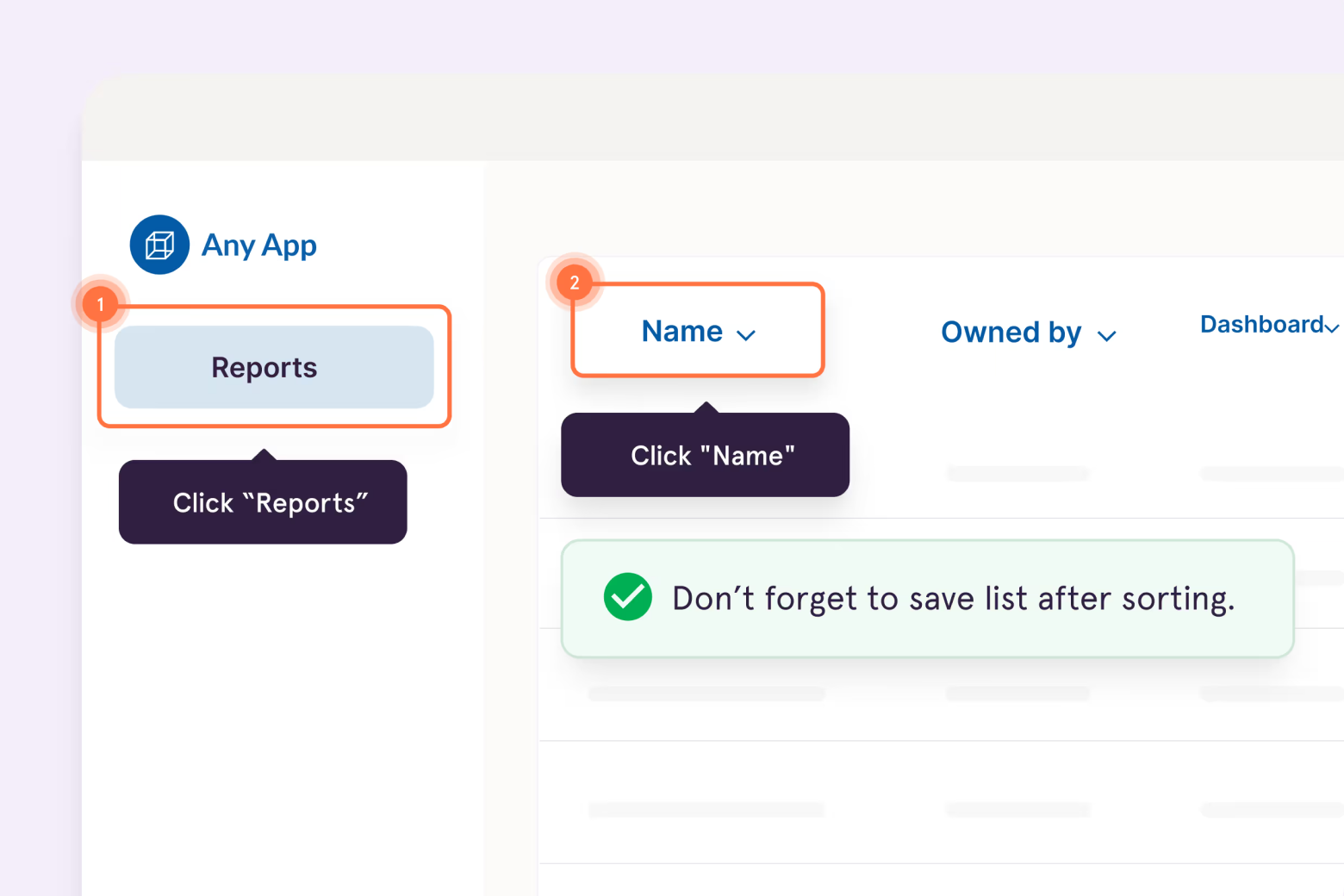
That’s why we built Guide Me: to give employees the right guidance, in the right place, at the right time. Guide Me delivers interactive, step-by-step guidance directly inside the software they're using, so they can complete processes without leaving their workflow to search for answers.
.gif)
Knowledge sharing is broken
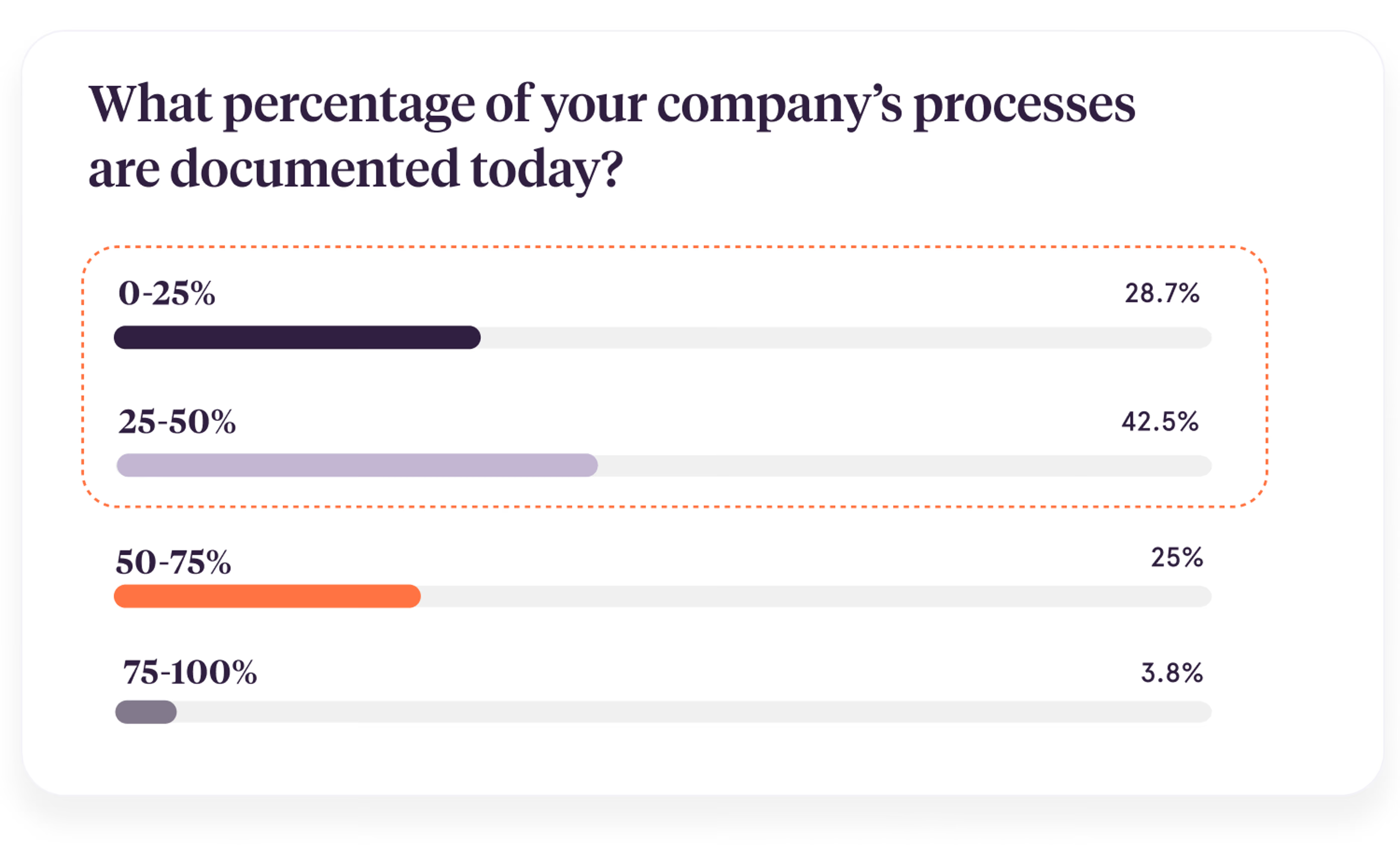
In a Tango survey, 71% of organizations reported having less than half of their processes documented.
Documenting a single process takes hours of tedious work. And processes are constantly changing, so it’s easy to see how you can fall behind.
Even when you do make how-to guides, the truth is people don’t like wordy documents and long videos. So you end up with outdated, boring training content that’s hard to find and even harder to use.
Screen sharing is not the answer
When people can’t unblock themselves through self-service, they ask an expert. Probably you. 😆 And then two people have to pay the price.
70% of people surveyed say they use screen sharing at least once a day to give or get answers at work. 50% are screen sharing multiple times every day!

Not to mention email and chat. It takes 23 minutes on average to get back “in the flow”—so these interruptions are costly.
Traditional software training isn't always enough
If your employee is in the middle of a task and they get stuck, here’s what they probably don’t want to do:
- Search multiple knowledge bases
- Read wordy documentation
- Watch long videos
- Switch back and forth between tabs
- Wait for someone to help them
They want answers fast, from a trusted expert, without tab or context switching.
Say hello to Guide Me
Guide Me walks employees through processes right inside the software they’re using, showing them exactly where to click on their screen and what to do next.
Do I really need another tool? Yes. 😁
You have a great set of tools for other modes of work. Zoom is nice when you need to have a conversation, make a decision, or vibe with your co-workers. Slack, Teams, and Loom are great for async communication. Notion, Asana, and other collaboration tools are helpful for brainstorming. You might even use a Learning Management System (like Trainual or Lessonly) for structured training.
These are wonderful tools (we use them at Tango!) but none of them are ideal for learning step-by-step software processes.

Guide Me offers the step-by-step, personalized experience people want and need—without the inefficiencies of documentation, video, and screen sharing.
6 Guide Me capabilities explained
Check out how Guide Me works and the biggest benefits for you, your co-workers, and your customers.
Why your co-workers and customers will love Guide Me👇
1. Get help without searching or switching tabs
Your Tango extension recommends Guide Me for the website you’re working on at that moment. So when you’re stuck, help comes to you.
Instead of becoming an expert at finding information and searching your knowledge base, you can spend more time becoming an expert at your craft. Plus, you get the satisfaction of being self-sufficient and sparing your co-workers an interruption.

2. See where to click—without ever leaving your screen.
It takes mental energy to 1) read a how-to guide or watch a video, 2) process the information, and 3) apply it. You have to filter out extra fluff, even if you just need help with one specific step in the process. When you’re in Get Sh*t Done Mode, that’s the last thing you want to do.
Guide Me shows you where to click right on your screen, so you can fly through your tasks and make fewer mistakes.

3. Get curated insights each step of the way
Sometimes a little extra context can be the difference between success and mediocrity.
Guide Me surfaces insights, pro tips, and warnings from your most experienced teammates in the context of each step, so you can perform every task like an expert.
Getting nuggets of knowledge in the flow of work (instead of in a classroom, a meeting, or a training video) makes it more likely that you’ll apply it when you need it—and therefore more likely you’ll remember it.

Why you will love Guide Me👇
4. Create step-by-step walkthroughs in seconds
Creating guidance is as easy as clicking through your process. When you’re done, Tango AI assembles all of the screens and button clicks, writes all of the step descriptions, and even names the process for you.
What used to take hours takes only minutes with Tango. And now you can capture 20x more processes (with 100x fewer headaches 😍) to ensure your team can confidently get sh*t done.

5. Crowdsource improvements from every user
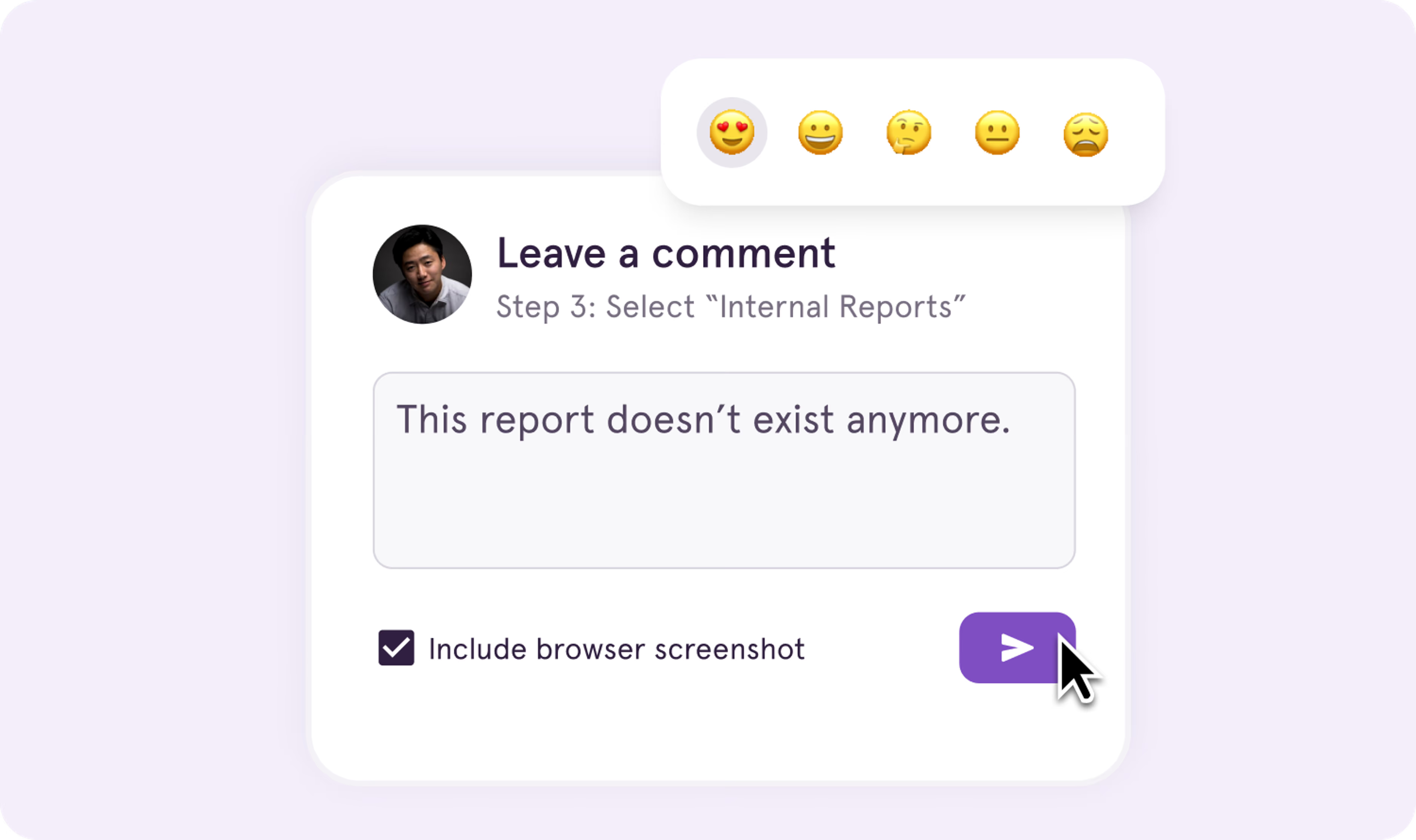
Software and best practices are constantly changing, so your process guides quickly become outdated. With Guide Me, users can send comments to share their ideas for improving each step.
They’ll feel more invested in the process, and you’ll benefit from keeping every process up-to-date with the collective knowledge of your team.
6. See your impact and fix bottlenecks
There’s nothing worse than taking the time to capture a process, sharing it out, and then…crickets. 🦗 Without insight into who’s using your process and how well it’s working, you can’t make improvements or invest your time where it will have the biggest impact.
The analytics dashboard shows you usage and bottlenecks so you can optimize your workflows and provide personalized help to everyone who needs it.



Next time someone asks, “how do I…?” Send a Tango.
Start capturing your first workflow today.

